Viewing Leave Requests
You can view all of your leave requests from the "My Leave" section. From here you can:
- See an overview of all upcoming leave
- Look at all requests for a specific leave policy.
If you are an administrator or a manager, you can also view the leave details of given employees.
General Guidance: Visit the "My Leave” Page
From the menu click on the "My Leave" link. This will take you to the My Leave page which gives you an overview of all the different types of leave.
You will notice that a cycle will have been selected - generally this will be the current leave cycle you are in. Check that the correct cycle has been selected.
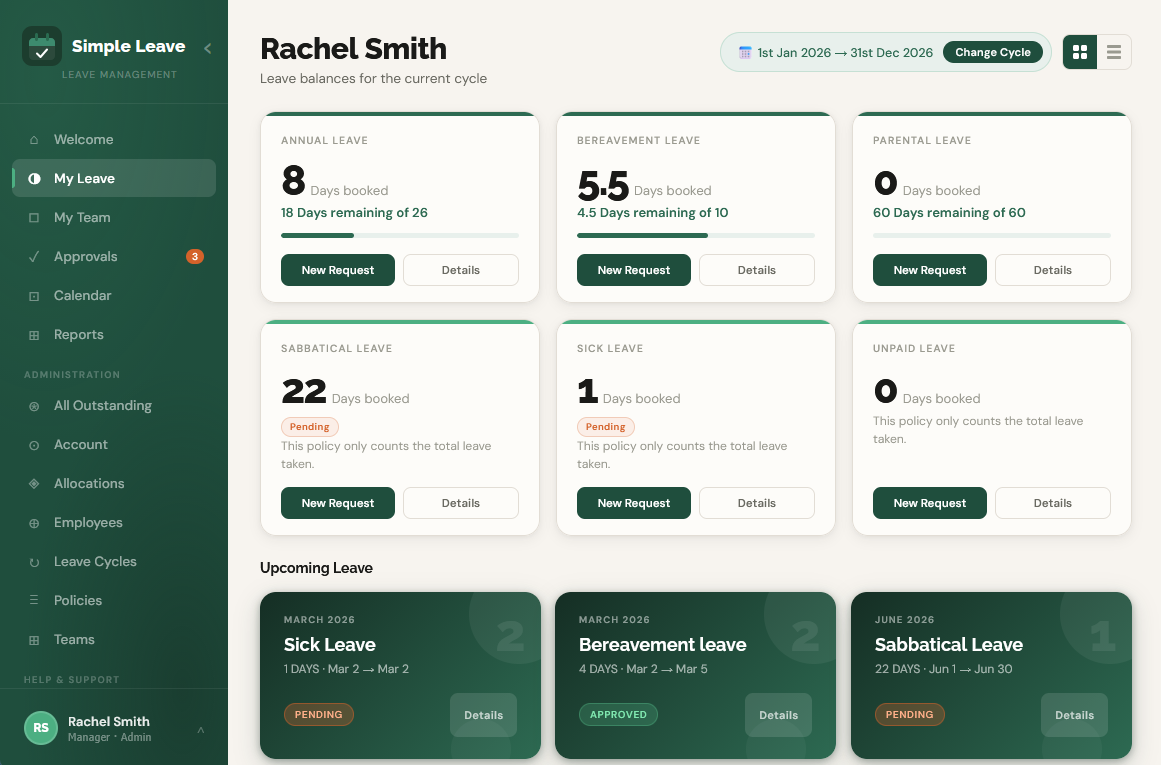
What do the tiles show?
If you have been given a certain allocation of leave against a policy, you will see:
- Total booked (in either days or hours)
- Total remaining (in either days or hours)
If your leave policy is set to just track the leave taken then you will just see the total amount of leave booked.
If you see (pending) next to the amounts it is because you have at least one leave request open that is still awaiting approval from your manager or an administrator.
To see more information on the Leave Details Page
Click on the View Details button to see all of the leave requests raised for the policy.
For each individual request you can go into the detail of it and see information such as comments made, the approver, an audit of the date, etc.
The Leave Details page also provides a running balance of your leave.
Cards vs Rows
The My-Leave page can show your data in cards or table rows, depending on what your preference is. Simply click the "Cards" or "Rows" icons in the top right to toggle between the two. Your choice will be saved for the next time you visit.
Administrators and Managers
Administrators can view the leave requests of all people on the platform. They can do this by navigating to Employees -> View Leave
Managers can view the leave requests of all people that they manage. They can do this by navigating to My Team -> View Details